 Back


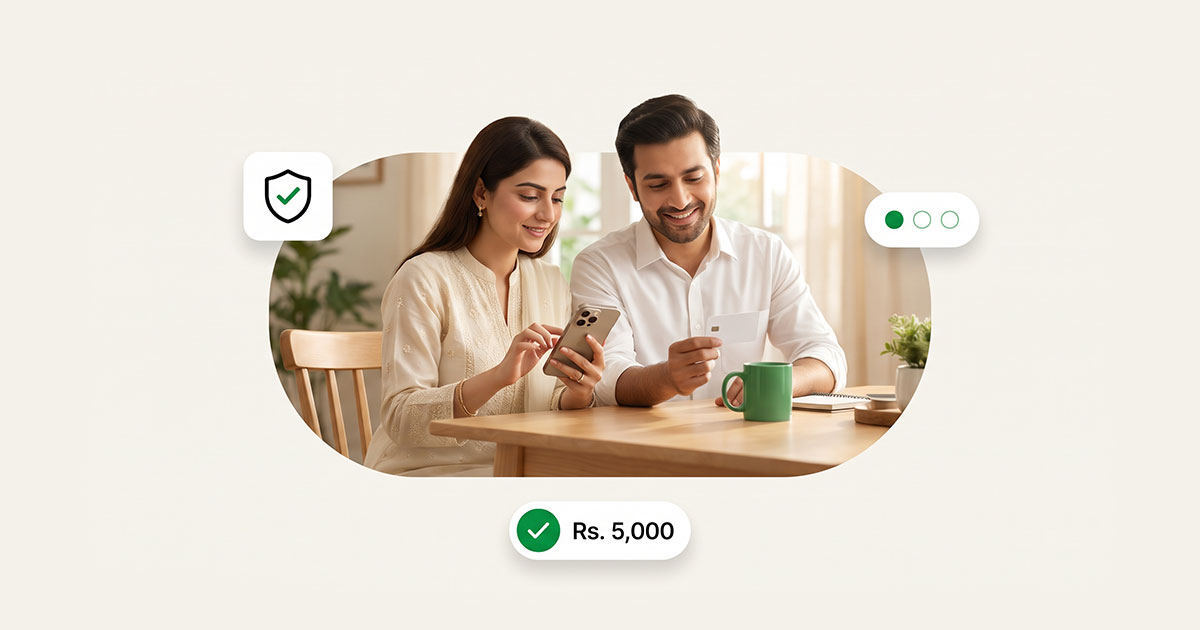
PostEx PayLater splits eligible purchases into 3 payments over 60 days: one at checkout, one after 30 days and one after 60 days.
This guide shows you how to manage each step in the app.
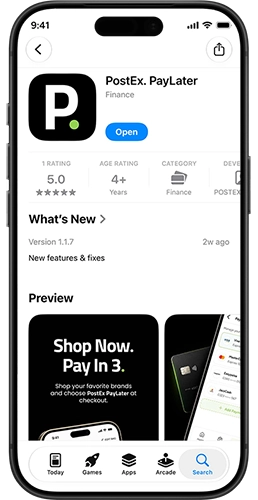
Step 1: Download and set up the PostEx PayLater app
The app is free on both iPhone and Android.
- Download the app from the Apple App Store (iOS 16.6 or later) or Google Play.
- Sign up with your name, mobile number and email.
- Verify your identity with your CNIC. You must be 18 or older.
- Add a debit or credit card for your payments.
Setup takes a few minutes. Approval and your shopping limit depend on PostEx's eligibility checks.
Step 2: Understand your home screen
The home screen gives you a quick view of your PayLater account.
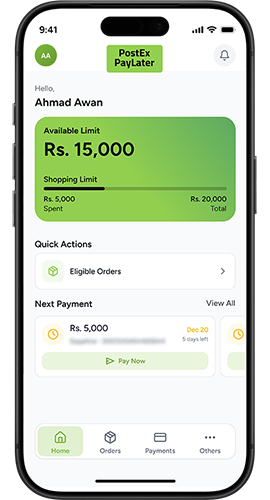
Here is what each part shows:
- Available limit: How much you can still spend with PayLater right now.
- Shopping limit progress: How much of your total limit you have used.
- Eligible Orders: A shortcut to orders you can split into 3 payments.
- Next payment: The amount and due date of your next instalment, with a Pay Now button.
- Bottom menu: Home, Orders, Pay and More.
Your available limit goes back up as you pay off instalments.
Step 3: Check eligible orders and split them into 3
There are two ways to use Pay in 3.
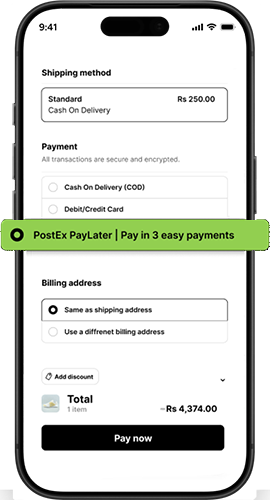
Option A: Choose PostEx PayLater at checkout
- Shop on a partner online store.
- Select PostEx PayLater as your payment method.
- Pay the first instalment to confirm your order.
Option B: Convert a Cash on Delivery order
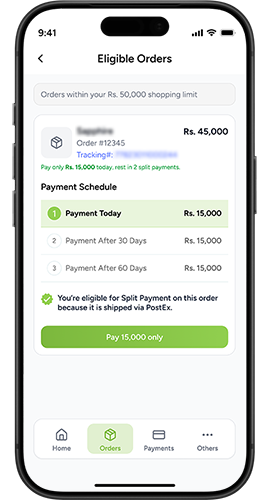
Already ordered with COD? Selected COD orders can be split into 3 payments.
- Place your order with Cash on Delivery as usual.
- Open the app and tap Eligible Orders.
- Pick the order and activate PayLater in a few taps.
- Pay the first instalment. The rest is due in 30 and 60 days.
Step 4: Track and pay your instalments
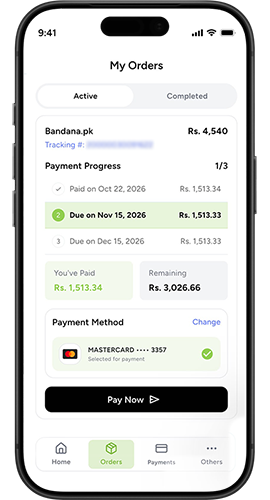
The Payments section shows every upcoming instalment, its amount and its due date.
To pay an instalment:
- Open the app and tap Pay Now on the home screen, or go to Pay in the bottom menu.
- Check the amount and due date.
- Choose your saved card and confirm.
To pay early: You can settle any remaining instalment, or your whole balance, before its due date. Paying early frees up your available limit sooner.
All payments go to PostEx PayLater, not to the store, and are processed securely through XPay, a PCI DSS-compliant payment gateway.
| Payment | Due | Example (Rs. 15,000 order) |
|---|---|---|
| 1st | At checkout | Rs. 5,000 |
| 2nd | 30 days later | Rs. 5,000 |
| 3rd | 60 days later | Rs. 5,000 |
Illustrative example. Any processing fee is shown before you confirm.
Step 5: Add and manage your payment methods
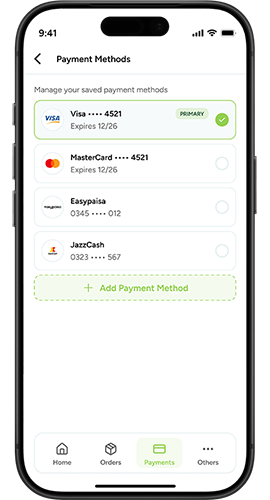
Instalments are paid by debit or credit card. No credit card is required, so a debit card works fine.
- Go to Payment Methods in the app.
- Tap to add a new card and enter its details.
- Set the card you want to use for upcoming payments.
- Remove old or expired cards to avoid failed payments.
Keep enough balance on your chosen card before each due date.
Returns, refunds and missed payments
If you return an item
- Contact the store first, within its return window.
- Also inform PostEx in writing within the same window.
- Keep paying your instalments as scheduled.
- Once the store refunds PostEx, your remaining instalments are adjusted.
If you miss a payment
- A late fee (Ta'widh) may apply, limited to PostEx's actual loss. Anything above that goes to charity, in line with Shariah rules.
- Your PayLater access may be paused.
- Overdue amounts may be reported to credit bureaus such as eCIB, DataCheck or Tasdeeq.
- If a missed payment stays unpaid for 5 business days after notice, the full remaining balance can become due.
If you think you'll miss a payment, pay what you can early or contact PostEx at (042) 111 786 227 before the due date.
6 tips to stay on top of your BNPL payments
- Check the app weekly. A quick look at your next payment keeps surprises away.
- Match due dates to payday. Plan purchases so instalments fall after your salary arrives.
- Keep your card funded. Make sure the card you pay with has enough balance before each due date.
- Update expired cards early. Replace old cards in Payment Methods before they cause a failed payment.
- Watch your available limit. Don't take on new Pay in 3 orders you can't comfortably repay.
- Pay early when you can. It clears your balance and frees up your limit for your next purchase.
Frequently asked questions
How do I check my next BNPL payment?
Open the PostEx PayLater app. Your next payment amount and due date appear on the home screen.
Can I pay my BNPL instalments early?
Yes. You can settle any instalment, or your full balance, early at any time through the app.
How do I pay my PostEx PayLater instalment?
Tap Pay Now on the home screen or go to Pay, check the amount and pay with your saved debit or credit card.
Can I change the card I pay with?
Yes. Go to Payment Methods to add a new card, choose which one to use or remove old cards.
How do I know which orders qualify for Pay in 3?
Tap Eligible Orders in the app to see every order you can split into 3 payments.
Can I split a COD order into instalments?
Yes, if it is eligible. Place the order with COD, then convert it to Pay in 3 from Eligible Orders in the app.
Why did my available limit go down?
Your limit drops when you make a PayLater purchase and goes back up as you pay off instalments.
What if I return a product bought with PayLater?
Return it through the store and inform PostEx. Keep paying until the refund is confirmed, then your remaining instalments are adjusted.
Is the PostEx PayLater app safe?
Yes. Payments are processed through XPay, which is PCI DSS-compliant, and data is encrypted in transit.
Stay in control, one tap at a time
Managing BNPL doesn't have to be complicated. With the PostEx PayLater app, you can see what you owe, when it's due and pay early whenever you like, all from your phone.
Get the app: Download PostEx PayLater on iOS or Android and pay in 3 over 60 days on your next order. For eligibility and full terms, visit postexpaylater.pk.